Two questions regarding file splitting


 Locked


Two questions regarding file splitting
 
|
I tried to split a file using AIJ, but it fails with a message that it is not a multi channel. I've included the fits header for your reference. Here os a link to as google drive. The file does split using ASTAP without any issues.
https://drive.google.com/file/d/1ajB5fBIyoPpQP70aP8-kJmfDZzfYEwsO/view?usp=drive_link The second question is that the image has a Bayer pattern of RGGB, but that pattern does not show up in the Debayer dialogue. Is there a way to add a pattern? Here is the fits header from the file. SIMPLE = T / C# FITS BITPIX = 16 NAXIS = 2 / Dimensionality NAXIS1 = 3704 NAXIS2 = 2778 BZERO = 32768 EXTEND = T / Extensions are permitted IMAGETYP = 'LIGHT' / Type of exposure EXPOSURE = 20.0 / [s] Exposure duration EXPTIME = 20.0 / [s] Exposure duration DATE-LOC = '2026-04-22T21:25:42.3975531' / Time of observation (local) DATE-OBS = '2026-04-23T03:25:42.3975531' / Time of observation (UTC) MJD-OBS = 61153.142851817 / Modified Julian Date of observation DATE-AVG = '2026-04-23T03:25:53.6144626' / Averaged midpoint time (UTC) MJD-AVG = 61153.1429816433 / Modified Julian Date of averaged midpoint XBINNING = 1 / X axis binning factor YBINNING = 1 / Y axis binning factor GAIN = 100 / Sensor gain OFFSET = 0 / Sensor gain offset XPIXSZ = 4.63 / [um] Pixel X axis size YPIXSZ = 4.63 / [um] Pixel Y axis size INSTRUME = 'SkyRaiderDS10CTEC(USB2.0)' / Imaging instrument name CAMERAID = 'MallinCam_\\?\usb#vid_0547&pid_f11f#a&22070cf3&0&1' / Imaging instrum SET-TEMP = 0.0 / [degC] CCD temperature setpoint CCD-TEMP = 1.0 / [degC] CCD temperature READOUTM = 'High Conversion Gain' / Sensor readout mode BAYERPAT = 'RGGB' / Sensor Bayer pattern XBAYROFF = 0 / Bayer pattern X axis offset YBAYROFF = 0 / Bayer pattern Y axis offset USBLIMIT = 2 / Camera-specific USB setting TELESCOP = 'Planewave 12.5 CDK' / Name of telescope FOCALLEN = 2541.0 / [mm] Focal length RA = 154.901429409391 / [deg] RA of telescope DEC = 19.8700239589367 / [deg] Declination of telescope CENTALT = 77.7245782405453 / [deg] Altitude of telescope CENTAZ = 173.536761467462 / [deg] Azimuth of telescope AIRMASS = 1.02329109817361 / Airmass at frame center (Gueymard 1993) PIERSIDE = 'East' / Telescope pointing state SITEELEV = 1343.0 / [m] Observation site elevation SITELAT = 31.9465833333333 / [deg] Observation site latitude SITELONG = -108.897722222222 / [deg] Observation site longitude OBJECT = 'AD Leo' / Name of the object of interest OBJCTRA = '10 19 36' / [H M S] RA of imaged object OBJCTDEC = '+19 52 12' / [D M S] Declination of imaged object OBJCTROT = 0.0 / [deg] planned rotation of imaged object FOCNAME = 'PWI4 Focuser' / Focusing equipment name FOCPOS = 31500 / [step] Focuser position FOCUSPOS = 31500 / [step] Focuser position FOCUSSZ = 1.0 / [um] Focuser step size ROWORDER = 'TOP-DOWN' / FITS Image Orientation EQUINOX = 2000.0 / Equinox of coordinates SWCREATE = 'N.I.N.A. 3.2.0.9001 (x64)' / Software that created this file CTYPE1 = 'RA---TAN' / first parameter RA, projection TANgential CTYPE2 = 'DEC--TAN' / second parameter DEC, projection TANgential CUNIT1 = 'deg ' / Unit of coordinates CRPIX1 = 1.852500000000E+003 / X of reference pixel CRPIX2 = 1.389500000000E+003 / Y of reference pixel CRVAL1 = 1.549454118143E+002 / RA of reference pixel (deg) CRVAL2 = 1.987519797748E+001 / DEC of reference pixel (deg) CDELT1 = 1.049512553692E-004 / X pixel size (deg) CDELT2 = 1.050072929176E-004 / Y pixel size (deg) CROTA1 = 8.502197698252E+001 / Image twist of X axis (deg) CROTA2 = 8.503933611866E+001 / Image twist of Y axis (deg) CD1_1 = 9.107000902222E-006 / CD matrix to convert (x,y) to (Ra, Dec) CD1_2 = -1.045553850270E-004 / CD matrix to convert (x,y) to (Ra, Dec) CD2_1 = 1.046139670619E-004 / CD matrix to convert (x,y) to (Ra, Dec) CD2_2 = 9.080168580153E-006 / CD matrix to convert (x,y) to (Ra, Dec) PLTSOLVD = T / Astrometric solved by ASTAP_CLI v2026.03.05. COMMENT 7 Solved in 0.2 sec. Offset was 2.5'. Mount offset RA = -2.5', DEC=-0.3' WARNING = 'Warning scale was inaccurate! Set FOV=0.29d, scale=0.4", FL=2526mm' COMMENT cmdline:"C:/Program Files/astap/astap_cli.exe" -f "D:/2026-04-22/LIGHT\A COMMENT D Leo\AD Leo_2026-04-22_21-25-42__1.00_20.00s_0912.fits" -update -ra 10. COMMENT 326761960626067 -spd 109.8700239589367 -fov 0.3866962284340181 -r 10.0 INPUTFMT = 'FITS ' / Format of file from which image was read SWOWNER = 'John Sikora' / Licensed owner of software BSCALE = 1.0000000000000000 /physical = BZERO + BSCALE*array_value |
Re: Two questions regarding file splitting
|
Administrator
|
The image you provided came up as RGGB by default and Debayered fine for me.
Be sure you are using the top Debayer option "Debayer to singel color/luminosity 1/4 size stackes". If that doesn't solve your problem, what version of AIJ are you running and what OS are you running? Karen 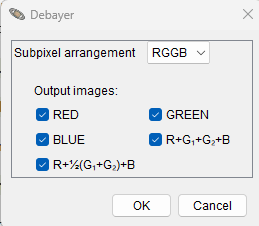 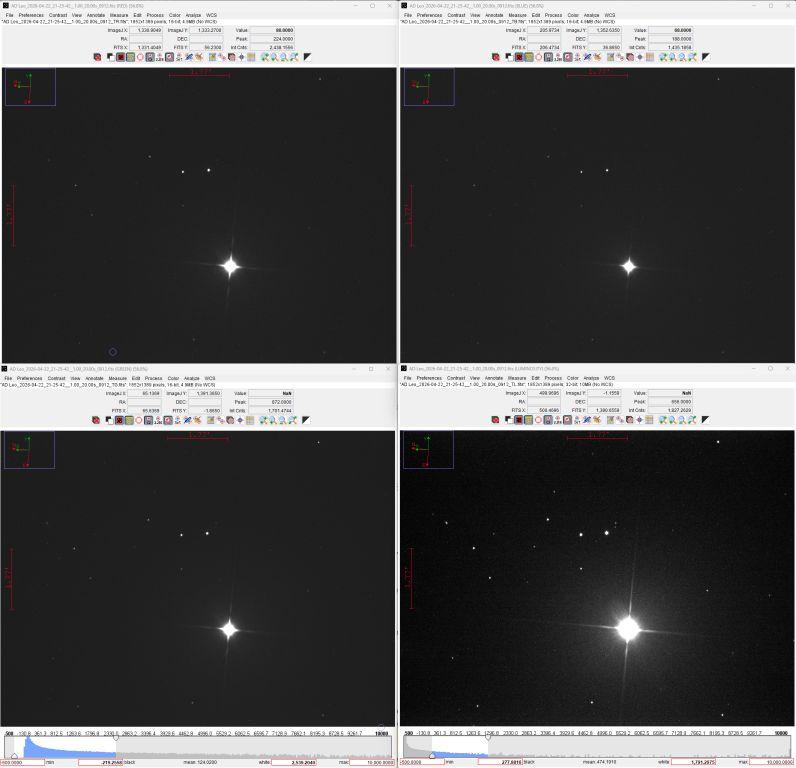
|
Re: Two questions regarding file splitting
|
|
In reply to this post by johnthelast
It looks like I was using the wrong Debayer method. I was using the Debayer from the "Plugins" menu. I did get the same results that you had. I ran into another issue when I carried this forward.
I'm writing a macro to debayer and split a folder of files. I'm assuming that the proper sequence is: 1) Open the image 2) Do the Debayer process you requested 3) Save the individual image files 4) close each window 5) Increment to the next file When I tried to record the macro to do items 1-4 above the following was recorded which did not show any command invocation to do the debayer or the actual save of the files. I also did not see any Debayer into the quarter size stacks in the command utilities list. open("C:/Temp/AD Leo_2026-04-22_21-25-42__1.00_20.00s_0912_cal small.fits"); selectImage("AD Leo_2026-04-22_21-25-42__1.00_20.00s_0912_cal small.fits"); selectImage("AD Leo_2026-04-22_21-25-42__1.00_20.00s_0912_cal small.fits"); selectImage("AD Leo_2026-04-22_21-25-42__1.00_20.00s_0912_cal small.fits (RED)"); selectImage("AD Leo_2026-04-22_21-25-42__1.00_20.00s_0912_cal small.fits (RED)"); selectImage("AD Leo_2026-04-22_21-25-42__1.00_20.00s_0912_cal small.fits (GREEN)"); selectImage("AD Leo_2026-04-22_21-25-42__1.00_20.00s_0912_cal small.fits (RED)"); selectImage("AD Leo_2026-04-22_21-25-42__1.00_20.00s_0912_cal small.fits (BLUE)"); selectImage("AD Leo_2026-04-22_21-25-42__1.00_20.00s_0912_cal small.fits (GREEN)"); selectImage("AD Leo_2026-04-22_21-25-42__1.00_20.00s_0912_cal small.fits (BLUE)"); selectImage("AD Leo_2026-04-22_21-25-42__1.00_20.00s_0912_cal small.fits (RED)"); selectImage("AD Leo_2026-04-22_21-25-42__1.00_20.00s_0912_cal small.fits (GREEN)"); selectImage("AD Leo_2026-04-22_21-25-42__1.00_20.00s_0912_cal small.fits (BLUE)"); close; close; close; selectImage("AD Leo_2026-04-22_21-25-42__1.00_20.00s_0912_cal small.fits"); run("Close", "subpixel=RGGB red=true green=true blue=true r+g₁+g₂+b=false r+½(g₁+g₂)+b=false"); <<warning: the options string contains one or more non-ascii characters>> close; |
Re: Two questions regarding file splitting
|
|
Just tried to record a macro with the same actions on the newest release 6.0.7.00 and didn't see any specific action record of the "Debayer to single...." to split the file.
Thanks. |
|
|
This should be fixed in 6.0.7.01, both the macro recording and the running of the debayer via macros. 6.0.7.01 is released as a daily build, so you will need to check for the update manually in AIJ via Help > Update AstroImageJ
This is the macro code to run it: run("Photometric Debayer", "subpixel=RGGB red=true green=true blue=true r+g_1+g_2+b=true r+_half(g_1+g_2)+b=true");The first option, subpixel, is what is the pattern of the file. If not specified by the macro, it will read from the FITS header if available. The other options control which output images are created. |
Re: Two questions regarding file splitting
|
|
Thanks for the fix. It works as described now.
|
«
Return to AstroImageJ
|
1 view|%1 views
| Free forum by Nabble | Edit this page |