|
Hello, I am new to this forum. My name is Eduard
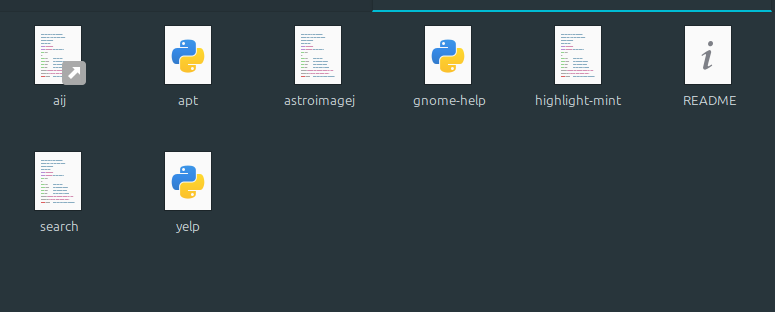
I am to install AstroImageJ as part of a University project however following the steps from here: https://www.astro.louisville.edu/software/astroimagej/installation_packages/AstroImageJ_installation_linux.html When trying to launch it I get the error "not found" in the terminal, precisely: ![]() I am not sure what "3:" means. The dot behind /AstroImageJ might mean it is a hidden file but I cannot see it. Saying that, is there a hidden file that is actually launched? From what I saw it's the "aij" or "astroimagej" files from /usr/local/bin that have to be launched from what I see in the instructions, point 8: 8. You may return to being a normal user now and try out AstroImageJ. Assuming /usr/local/bin is in your search path aij or astroimagej commands will start the software ![]() Things I tried: - cd /usr/local/bin before trying to launch - tried to launch with and without sudo - I installed Java (openjdk-11-jre) as I think AstroImageJ requires java - Used the double click ---> Run in terminal option on the aij and astroimagej files and nothing happens I have done all of the steps in the installation guide successfully however launching the software is the only issue. Thank you for your time and support |

|
The "3" is the 3rd line of the file you are executing. The "./" means "current directory". This is the response from running "astroimagej", the script that you created in "/usr/local/bin". That's working, but it is not finding the installed "AstroImageJ" software.
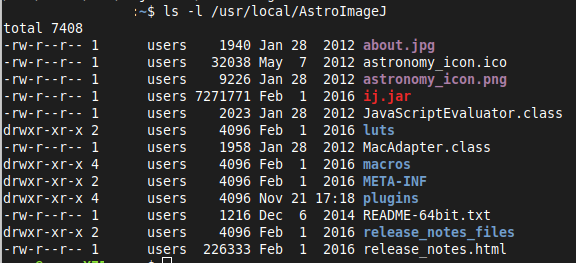
If you are working in your own space on the computer, not running as root or "sudo", what is the response to this command in a terminal? ls -l /usr/local/AstroImageJ The program "astroimagej" is looking for the AstroImageJ in the installation directory but does not find it, so let's find out why it is not there. Alternatively, I can help you install AstroImageJ in our own home directory which works fine with the latest version when this is your own computer and you do not need to share it with other users. |
|
This post was updated on .
Hello johnk thank you very much for your time and assistance this is much appreciated.
I understand now about the third line, what is shown in the terminal is exactly the third line in the executed file. I had run the command and got the following list: ![]() (I just removed out my username, I am not sure though whether there is any risk in having it displayed publicly) I use my personal computer that is not shared with other users. It is worth mentioning that we have been instructed to use version 3.2.0 rather than the newest version, that is, AstroImageJ_v3.2.0_20160201_linux.tar.gz I have used the internet archive to go back to a page where the 3.2.0 version was the current one at the time and the instructions are identical. |
|
I think that the issue is that you've installed 3.2 . If this were successful it would prompt for you to install 5.0 . The differences are significant in how well it runs with new features not present in 3.2 and of course bug fixes. However these improvements should not affect its use for assignments.
The cause of the error message is that the script is appropriate for version 5 and not for version 3. The ideal way forward is to remove 3.2 by carefully going to your /usr/local directory, and with sudo enter rm -r AstroImageJ to delete the folder and its contents. You could then install 5 in your home directory this way: As root or sudo, remove the script "astroimagej" from /usr/local/bin Then as your normal user working in your home directory cd tar xvf <installation package tar file> Now when you try ls -l AstroImageJ you will see this aij.log cfitsio LICENSE README.txt AstroImageJ ij.jar luts release_notes_files AstroImageJ.cfg images macros release_notes.html AstroImageJ.desktop Jama.jar MANIFEST.MF AstroImageJ.png javax.mail.jar observatories.txt astronomy_icon.png jre plugin and that "AstroImageJ" is the program. I usually make a soft link from a directory in my PATH to this file. To do that, check echo $PATH and you may see your own "bin" folder there. In that folder, try this in a terminal ln -s ~/AstroImageJ/AstroImageJ aij to create a link to the executable file. The "~" is a shortcut for /home/<user> so that's equally good for this. If that's successful, the command in a terminal "aij" will start it and you are in business. Here "aij" can be whatever you want. The softlink simply make it easier to find and if you want to have a desktop icon you can also create one that executes your AstroImageJ program by pointing directly to it. Installing AIJ in your home directory will make keeping it up to date easy too. If you really must use 3.2 as installed, then you should not try to update it. You will have to edit the "astroimagej" script to match. I could help with that. To make its access easier if you have a "bin" directory of your own you can create a soft link to the executable file in AstroImageJ |
|
Thank you for the indepth explanations johnk.
I will proceed to remove the 3.2.0 version and install the 5.0.0 one instead following your and the instructions on the site and will update here right away if it works. |
|
In reply to this post by johnk
I have reinstalled and now it does seem to work and this window is being opened when running aij/astroimagej via terminal:
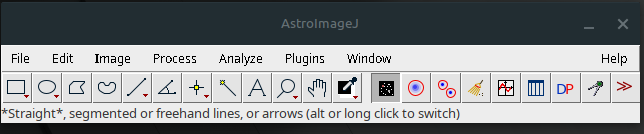
![]() Ironically, yesterday after I installed version 3.2.0 I did find and open that app/window when trying to open various files from the AstroImageJ folder manually (as in, in Microsoft fashion by going to the icons and double-clicking rather than using the terminal) but I was not aware that the small window is the app's interface, I was thinking is going to be a full screen app like Stellarium or others. Nonetheless I do not think there should be any issues using the latest version over 3.2.0. @johnk may you please confirm that the window in the image above is indeed the app's interface? Then I will be reassured and can proceed with processing astronomy images etc. Thanks a lot |
|
Yes, that is the interface. Use File and load a fits image to have a comprehensive one for Astronomy.
|
| Free forum by Nabble | Edit this page |